Failure guide
Poor First Layer Fix
The first layer tells you almost everything: gaps mean too high, ridges mean too low, uneven corners point to mesh or tilt. Run one patch before touching the rest of the profile.
Independent third-party notes. Verify firmware, heater, electrical, and vendor-specific work against official documentation for your exact printer.
Match your symptom first
Pick the closest pattern, then run one proof test.
Start here
The nozzle-to-bed distance or surface condition is wrong for the first layer.
The first layer tells you almost everything: gaps mean too high, ridges mean too low, uneven corners point to mesh or tilt. Run one patch before touching the rest of the profile.
- Check first
- Wash the plate, then print a small first-layer patch in the center and corners.
- Change only this
- Z offset or first-layer height, not flow and temperature together.
- Verify with
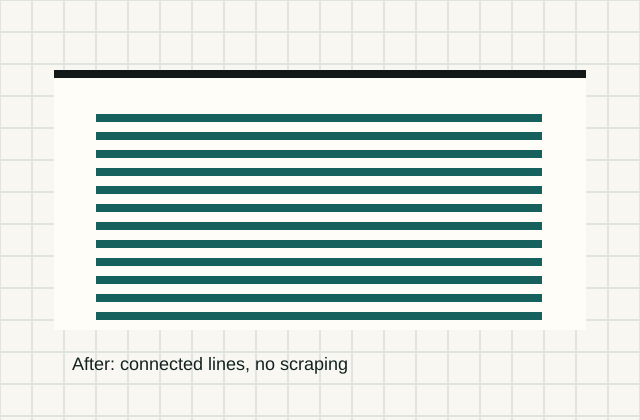
- A one-layer patch with connected lines, clean edges, and no nozzle scraping.
- Time
- 4 min setup
- Risk
- Low
- Needs purchase
- No, unless the plate coating is damaged.
Pick what you see
Poor First Layer mini diagnosis
Pick the first-layer pattern you can actually see, then change one Z/plate variable only.
Round separate lines with gaps between passes
- Likely cause
- Nozzle is too high or the plate is not gripping.
- First test
- Wash the plate, then print the five-patch first-layer STL in the same bed area.
- Change only this
- Lower Z offset in 0.02 mm steps.
- Parameter range
- Live Z / Z offset: 0.02 mm steps; rarely more than 0.10 mm from known-good setup
- Stop when
- Lines are connected but not translucent or ridged.
- Verify with
- Adjacent lines touch without loose strands when the patch cools.
Pick the exact path
Most failed fixes go wrong when they start from the wrong branch.
A1 or A1 mini, textured PEI, auto calibration completed, but the first layer still shows gaps, rough ridges, or one loose corner.
- First test
- Wash the textured sheet, run calibration, then print the five-patch first-layer STL without changing flow.
- Change only this
- Plate cleaning first; then live Z in 0.02 mm steps only if the patch still proves a height issue.
- Stop when
- All five patches show connected lines without nozzle scraping or loose corners.
The printer worked before a nozzle, hotend, or toolhead change, then the whole first layer shifted high or low.
- First test
- Check nozzle seating and heat-tightening, then run the five-patch test with the old slicer profile.
- Change only this
- Nozzle seating or Z offset. Do not retune flow before proving the mechanical change.
- Stop when
- The patch returns to the old squish pattern with the same material and temperatures.
PETG bonds aggressively, leaves marks, or risks tearing the PEI coating while the first layer still looks over-squished.
- First test
- Print one small PETG patch after cooling fully; compare release force before changing bed temperature.
- Change only this
- Release surface or Z squish. Do not raise bed temperature to solve a release problem.
- Stop when
- The part stays down during printing and releases cleanly after cooling.
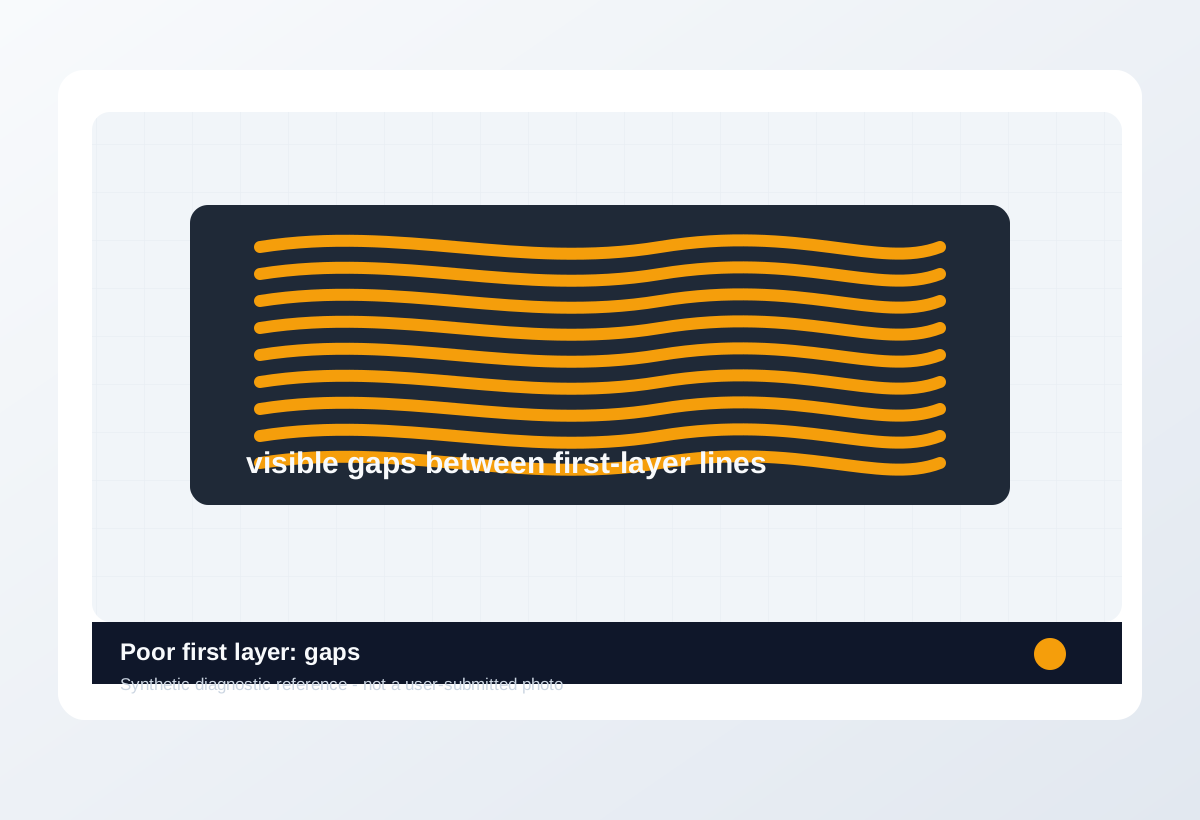
Visual diagnosis
Match the visible pattern before changing settings.
Original synthetic diagnostic reference plus licensed look-alike references; confirm with the test or log evidence below.
- Lines are separate, rope-like, scraped, or lifting in the first minute.
- The problem starts before infill or upper walls matter.
- One bed area may look different from another.
- Random strings between towers are a stringing problem, not first-layer Z.
- Layer shift after several millimeters is motion hardware, not the first layer.
- A print that detaches after hours may be warping after the first layer, not just Z offset.
- Warping after a good first layer
- PETG over-adhesion on smooth PEI
- Partial clog causing missing first-layer lines
- Elephant foot from too much squish or heat
- Line contact: separate, just touching, or plowed into ridges.
- Whether only corners fail or the whole bed fails.
- Plate surface: fingerprints, glue residue, coating damage, or debris.
- Nozzle drag marks or translucent over-squished lines.
- Exact Z offset number
- Probe repeatability
- Whether the plate coating is permanently damaged
- Whether the filament is contaminated or wet
Trust visual library
Use the image type, not just the picture.
Real references, look-alikes, material context, and synthetic diagnostic examples are separated so they do not overclaim what a photo can prove.
Real reference


.jpg?width=1280)
.jpg)


Synthetic diagnostic reference
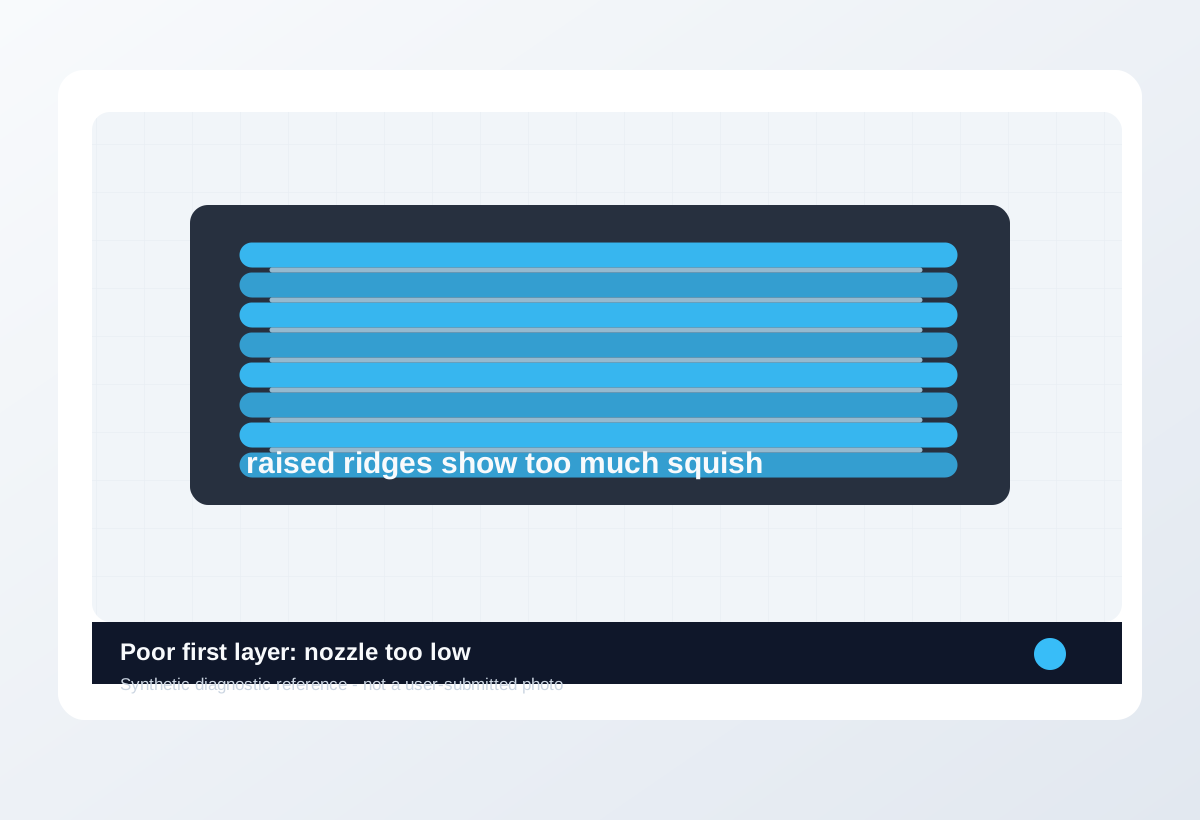
Before / after
Compare one small test, not a whole print.
Use the same small test before and after the change so the comparison means something.
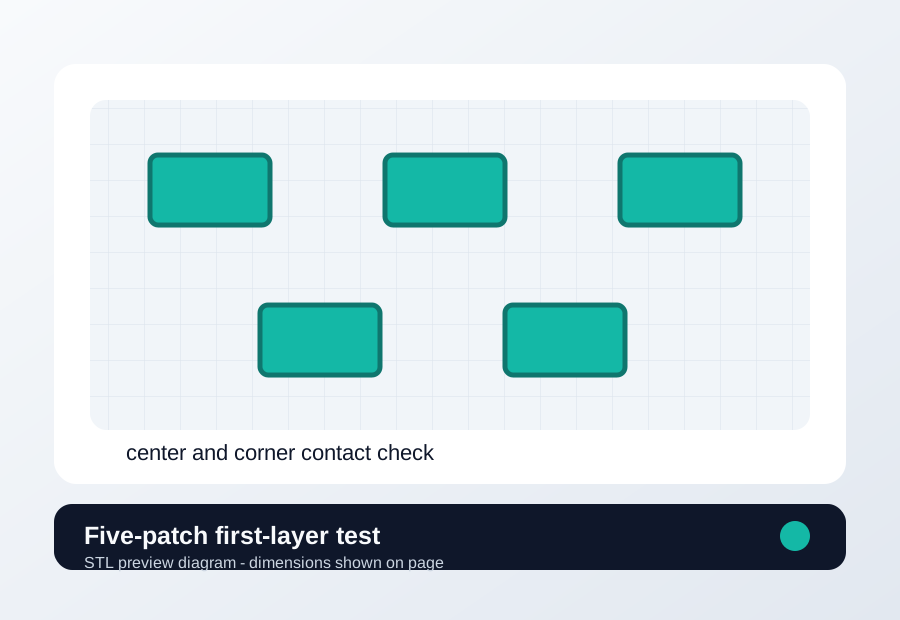
Download a quick test
Five-patch first-layer test
Check center and corners after plate cleaning, nozzle work, or Z offset changes.
- File
- STL
- Typical time
- 3-7 min
- Material
- PLA for baseline; PETG only if diagnosing a PETG-specific plate issue.
- Dimensions
- 120 x 90 x 0.3 mm overall; five thin patch zones.
- Footprint
- 120 x 90 mm
- Height
- 0.3 mm
- Layer height
- Use the profile first-layer height, usually 0.20-0.28 mm.
- Infill
- 0%; single-layer patches only.
- Walls
- Default wall count is fine; do not tune flow here.
- Supports
- Off.
- Speed
- 20-30 mm/s first-layer troubleshooting range.
- Material spool
- Nozzle temperature
- Bed temperature
- First-layer speed
- Slicer profile except the one tested setting
- Use your normal first-layer height.
- Keep bed temperature and plate surface unchanged.
- Disable brim, raft, ironing, and adaptive flow tricks.
Recommended Checks
0/4 doneVerification
- Lines are connected with a smooth top texture and no transparent gaps.
- The nozzle does not click, drag, or leave rough ridges across the patch.
- A normal part starts without manual babysitting or corner lift.
Only if the test points here
Tools and supplies for the proven branch
Plate cleaning and release kit
Wash the plate, print the same first-layer patch in two bed areas, then compare release and line shape.
- Buy signal
- The failure follows a scratched, polished, contaminated, or PETG-sensitive surface after Z offset is already sane.
- Skip if
- The same patch fails in every area before cleaning or Z offset is verified.
- Save evidence
- Bottom photo, plate-area photo, material, bed temperature, and whether the patch moved with the plate area.
Clean first, then replace or add release only if the failure follows the plate surface.
- PEI-safe cleaner or dish soap workflow
- Release layer only for PETG-risk surfaces
- Replacement sheet that matches your printer size and magnet system
- A new plate for a dirty plate
- Release agent for PLA that already will not stick
Nozzle and cleaning kit
Run a hot extrusion or cold-pull check, then print a small flow wall with the same filament and temperature.
- Buy signal
- Extrusion curls, skips, or stays inconsistent after cleaning, or a brass nozzle has seen abrasive filament.
- Skip if
- The problem is only first-layer Z, bed mesh, or wet filament.
- Save evidence
- Free-air extrusion photo, cold-pull result, nozzle size/material, filament type, and whether flow changed after cleaning.
Replace the nozzle only after the extrusion path test makes the blockage or wear visible.
- Correct nozzle thread and length
- Brass for normal PLA/PETG
- Hardened steel or similar only for abrasive filaments
- Cleaning needles sized for the nozzle
- Hardened nozzles as a first-layer fix
- Random nozzle packs that do not match the hotend
Print Fixes may earn from qualifying purchases when commerce links are configured. Diagnostic steps stay independent: buy only when the failure evidence points to the part.
Field guide
Follow the branch that matches your print
Round separate lines with gaps between passes
- Likely cause
- Nozzle is too high or the plate is not gripping.
- First test
- Wash the plate, then print the five-patch first-layer STL in the same bed area.
- Change only this
- Lower Z offset in 0.02 mm steps.
- Verify with
- Adjacent lines touch without loose strands when the patch cools.
- Stop when
- Lines are connected but not translucent or ridged.
Transparent lines, ridges, scraping, or nozzle plowing
- Likely cause
- Nozzle is too low or first-layer flow is too heavy.
- First test
- Print only the center patch and watch the nozzle during the first two lines.
- Change only this
- Raise Z offset in 0.02 mm steps before changing flow.
- Verify with
- The nozzle no longer scrapes and line tops are slightly flattened.
- Stop when
- Ridges disappear without creating gaps between lines.
Same bad first layer after touching the plate
- Likely cause
- Oil, dust, glue residue, or incompatible cleaning method is blocking adhesion.
- First test
- Clean using the plate maker method and repeat one patch without changing slicer settings.
- Change only this
- Plate cleaning only.
- Verify with
- The same patch sticks with the old Z value.
- Stop when
- Adhesion returns after cleaning; do not keep moving Z.
Center patch is good but one corner is loose or scraped
- Likely cause
- Mesh, gantry tilt, probe repeatability, plate seating, or bed level differs by area.
- First test
- Print all five patches and mark which corner fails.
- Change only this
- Reseat plate and rerun mesh/leveling, not global Z.
- Verify with
- All patches show the same squish pattern.
- Stop when
- Corner behavior matches the center within one small Z adjustment.
One spot never sticks or shows scratches/coating gaps
- Likely cause
- Plate coating is damaged or contaminated beyond normal cleaning.
- First test
- Move the patch to a clean area or flip/swap the plate if possible.
- Change only this
- Print location or plate side.
- Verify with
- The same model works on an undamaged area with unchanged slicer settings.
- Stop when
- Failure follows the damaged plate area rather than the model.
Concrete Parameter Range
| Setting | Start | Range | Change when | Stop when | Too far looks like |
|---|---|---|---|---|---|
| Live Z / Z offset | Current known-good value | 0.02 mm steps; rarely more than 0.10 mm from known-good setup | Lines are round/separate or plowed/ridged | Lines just touch with no scraping | Too low creates ridges, translucent lines, or nozzle drag; too high creates gaps and loose strands. |
| First-layer speed | 20-30 mm/s troubleshooting range | 15-35 mm/s | Small features pull loose after Z is correct | Patch sticks without distorted corners | Too slow can overheat tiny details; too fast pulls corners loose. |
| Bed temperature | Material profile | PLA 55-65 C, PETG 70-85 C, ASA/ABS 90-110 C | Correct Z and clean plate still release early | Patch stays down and releases after cooling | Too hot can cause elephant foot, glossy over-squish, or PETG over-adhesion. |
| First-layer nozzle temperature | Profile value | +0 to +10 C above normal print temp | Correct Z still does not wet the surface | Lines wet the plate without elephant foot | Too hot makes edges soft, glossy, or swollen. |
| Initial layer flow | 100% or profile default | 95-105% only after Z is proven | Correct Z shows uniform but slightly narrow/wide lines | Patch measures and looks consistent | Too high mimics low Z; too low mimics high Z. |
Material / Machine Differences
Wrong Turns
Stop tuning when
Do not keep chasing perfection after the signal is clear.
- The five-patch STL shows connected lines in center and corners.
- Another 0.02 mm Z step makes the patch worse.
- The problem follows one damaged plate area instead of settings.
- A normal small part completes its first layer without manual rescue.
Common setups
Jump to the branch that matches your machine or material
Copy before changing more settings
First-layer diagnostic brief
Fill this out after the first test so the next branch is based on evidence, not memory. The useful case is the one where only one variable changed.
Printer:
Slicer:
Firmware:
Material:
Nozzle size/material:
Bed surface:
Exact symptom:
Recent change:
First test run:
One change tested:
Result:
Next branch:Still not matching?
Jump to the next likely diagnosis
Problem Pattern
A weak first layer shows as gaps, loose strands, rough ridges, nozzle drag, or one corner behaving differently from the center. Auto leveling still needs a clean plate and a correct offset.
Likely Causes
- Build plate has skin oil, dust, old glue, or material residue.
- Z offset is too high, causing gaps and loose strands, or too low, causing scraping and ridges.
- Bed mesh, probe offset, or gantry alignment does not match the real plate position.
- First-layer speed, temperature, or extrusion width is too aggressive for the material and surface.
Print Context
- Applies to
- Auto bed leveling, PEI plates, Bambu, Prusa, Klipper, OrcaSlicer
- Best first move
- Clean the plate and run a one-layer patch before tuning the whole print.
- Do not start with
- Flow calibration while the nozzle height is visibly wrong.
After the test
Use the result, do not keep changing random settings.
If one check clearly changes the print, repeat that exact test once before moving on. If nothing changes, switch diagnosis instead of stacking more slicer edits.
Warnings
- A nozzle that is too low can damage build surfaces and create false over-extrusion symptoms.
- Auto bed leveling does not clean the plate or fix a wrong probe offset.
- Do not scrape a PEI coating aggressively while trying to fix adhesion.
- A print that clearly shows poor first layer, especially if the same failure repeats.
- You want one next move instead of five profile edits.
- The printer is showing a firmware, heater, or electrical safety warning.
- You are copying numbers from a different printer as final values.
More traps to avoid
- Changing several slicer settings at once and losing the actual cause.
- Ignoring filament condition or bed cleanliness while tuning advanced values.
- Keeping one global profile for different materials, brands, colors, and nozzle sizes.
Bench Note
Page: Poor First Layer Fix
Printer / firmware:
Slicer profile:
Filament brand and material:
Nozzle size:
Bed surface:
Recent changes:
First check run:
One change tested:
Result:
FAQ
Is this a bed mesh problem?
Only if different plate areas behave differently after cleaning and center Z offset are correct.
Should I raise bed temperature?
Only after the first-layer pattern shows correct squish. Temperature cannot fix a nozzle that is too high or too low.
When should I replace the plate?
Replace it when coating damage or permanent contamination repeats after cleaning and correct Z setup.